TL;DR
Every computer system needs fast-access storage for data, and that's exactly what Main Memory is. However, we all know that Main Memory comes at a steep price per gigabyte compared to Hard Disk Drives (HDD). Because of this, the Operating System (OS) must do everything it can to manage Main Memory as cost-effectively as possible.
Every computer system needs fast-access storage for data, and that’s exactly what Main Memory is. However, we all know that Main Memory comes at a steep price per gigabyte compared to Hard Disk Drives (HDD) (unless you’re from a future where we’ve figured out how to make it cheap, or it’s become obsolete: hello, humans or robots from the future! 👨🏻🤖). Because of this, the Operating System (OS) must do everything it can to manage Main Memory as cost-effectively as possible. There are many ways to do this, and each OS developer chooses what they believe works best. And since operating systems are constantly evolving—just notice how Windows Update or macOS Update always seems to arrive when you’re in a hurry 😅—new features, improved security, and better resource management are always changing. So in this article, we’ll cover the very basics that early operating systems used, to help you understand the fundamentals of main memory management.
🔑 Key terms
Before diving into today’s main topic, let’s quickly go over some definitions we’ll be using throughout this article to make sure we’re on the same page:
- OS = Operating System
- Process = A program currently running (Note: not the formal definition; you can read more at Process (computing))
- Main Memory = Primary memory, e.g., RAM
Memory Partitioning
Since each process in a system varies in size—some are small and don’t need much memory, while others are large and require significant space—early operating systems came up with the idea of partitioning, or dividing the total memory space into smaller sections, with each process occupying one such section.
Memory Partitioning can be divided into two main types:
- Fixed Partitioning — Memory is divided into partitions when the OS first starts up (e.g., at boot time), and these partitions remain fixed throughout. If it’s split into 16 slots, it stays 16 slots forever.
- Dynamic Partitioning — No partitions exist at startup. Memory is divided on demand during operation, with the number of partitions increasing or decreasing as needed.
Fixed Partitioning
Once partitions are created (typically at OS startup), they remain permanent. This approach has two variants:
1. Equal-size Partitioning

Main Memory is divided into equal-sized blocks. For example, with 64MB of main memory, we could split it into eight 8MB slots (8 × 8MB = 64MB).
The advantage of this method is its simplicity for the OS—it doesn’t need to think much, just divide everything equally. However, the downside becomes apparent when our memory looks like this:
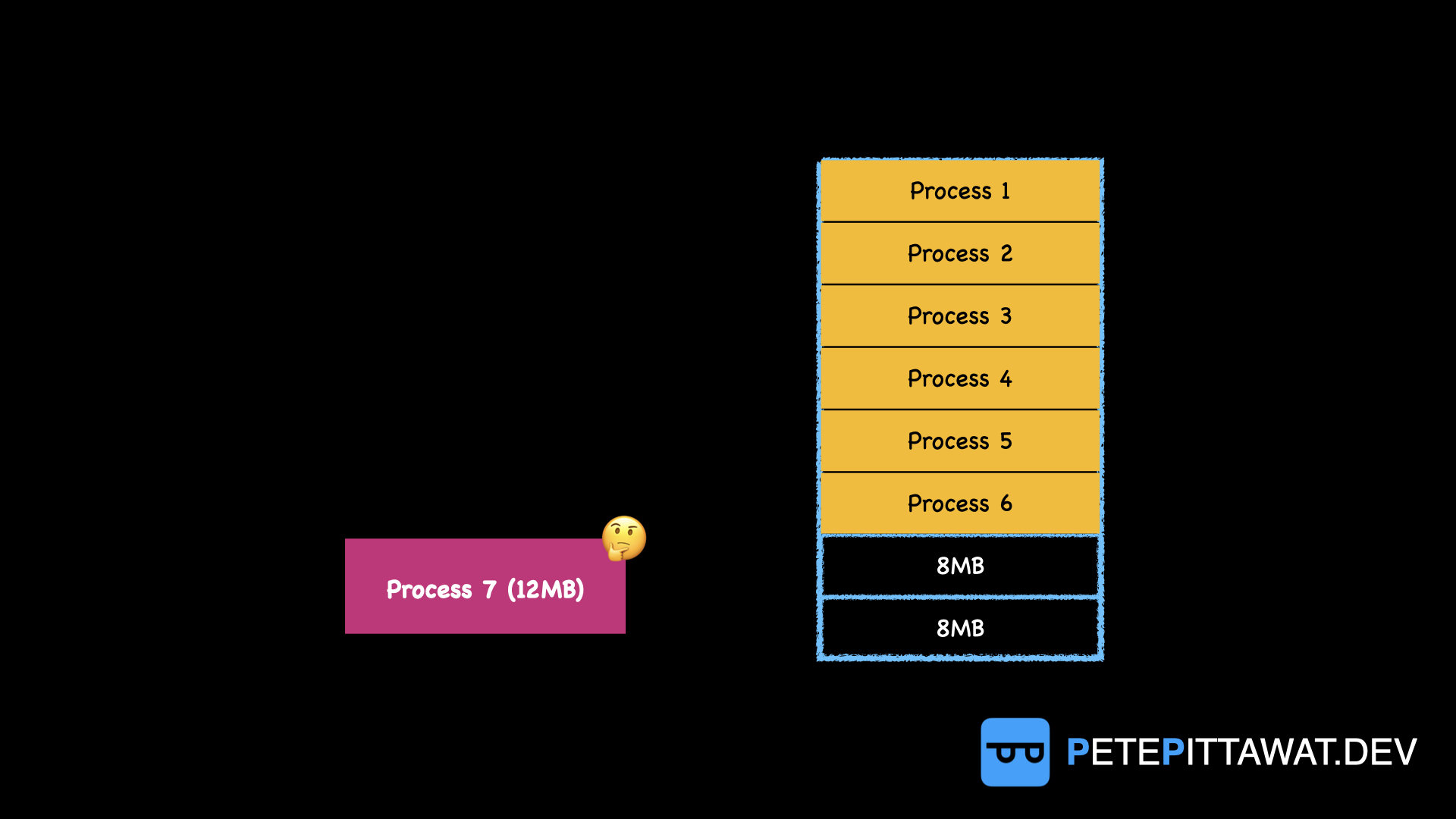
We have 16MB of free space remaining, but if a 12MB process arrives, it cannot be loaded. As mentioned earlier, each slot can only be owned by a single process.
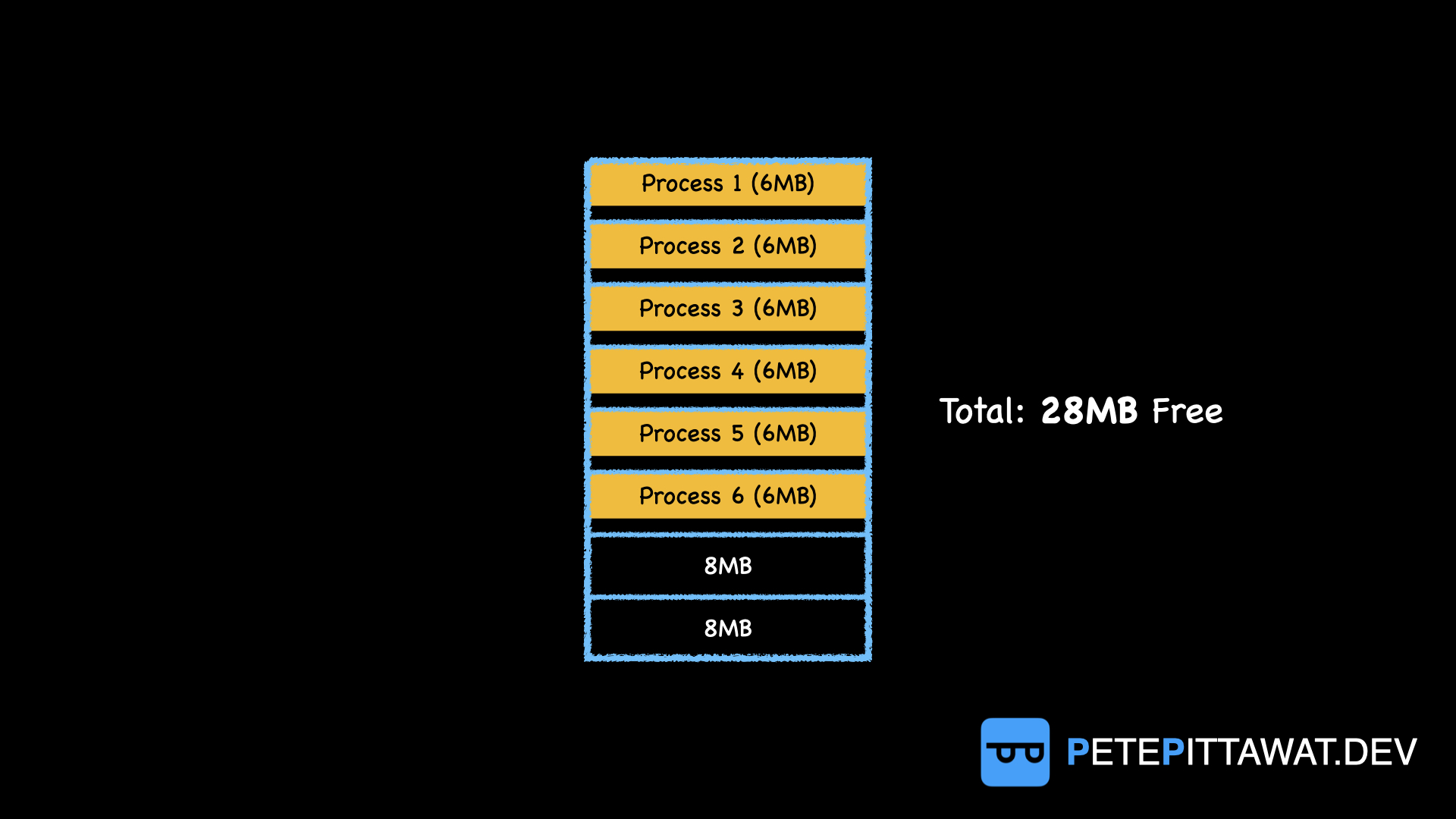
Conversely, if our system is filled with small processes—say, 2MB processes being loaded—each 8MB slot in main memory can only be occupied by one process. This wastes 6MB of space per slot. We call this situation, where a process is smaller than its allocated slot and leaves unused space, Internal Fragmentation.
2. Unequal-size Partitioning
To address the two problems mentioned above, an alternative approach was developed. Instead of dividing memory into equal slots, we use unequal sizes. For example, with 64MB of main memory, we could partition it as: 1MB + 1MB + 2MB + 4MB + 8MB + 16MB + 32MB = 64MB.
As you can see, this method allows small processes to fit into small slots and large processes into larger slots, reducing Internal Fragmentation. Additionally, very large processes have a better chance of being loaded into main memory. However, drawbacks remain: we only have one large slot (32MB), so large processes may need to wait in a queue to use it. Furthermore, small processes can still end up in large slots, so Internal Fragmentation persists.
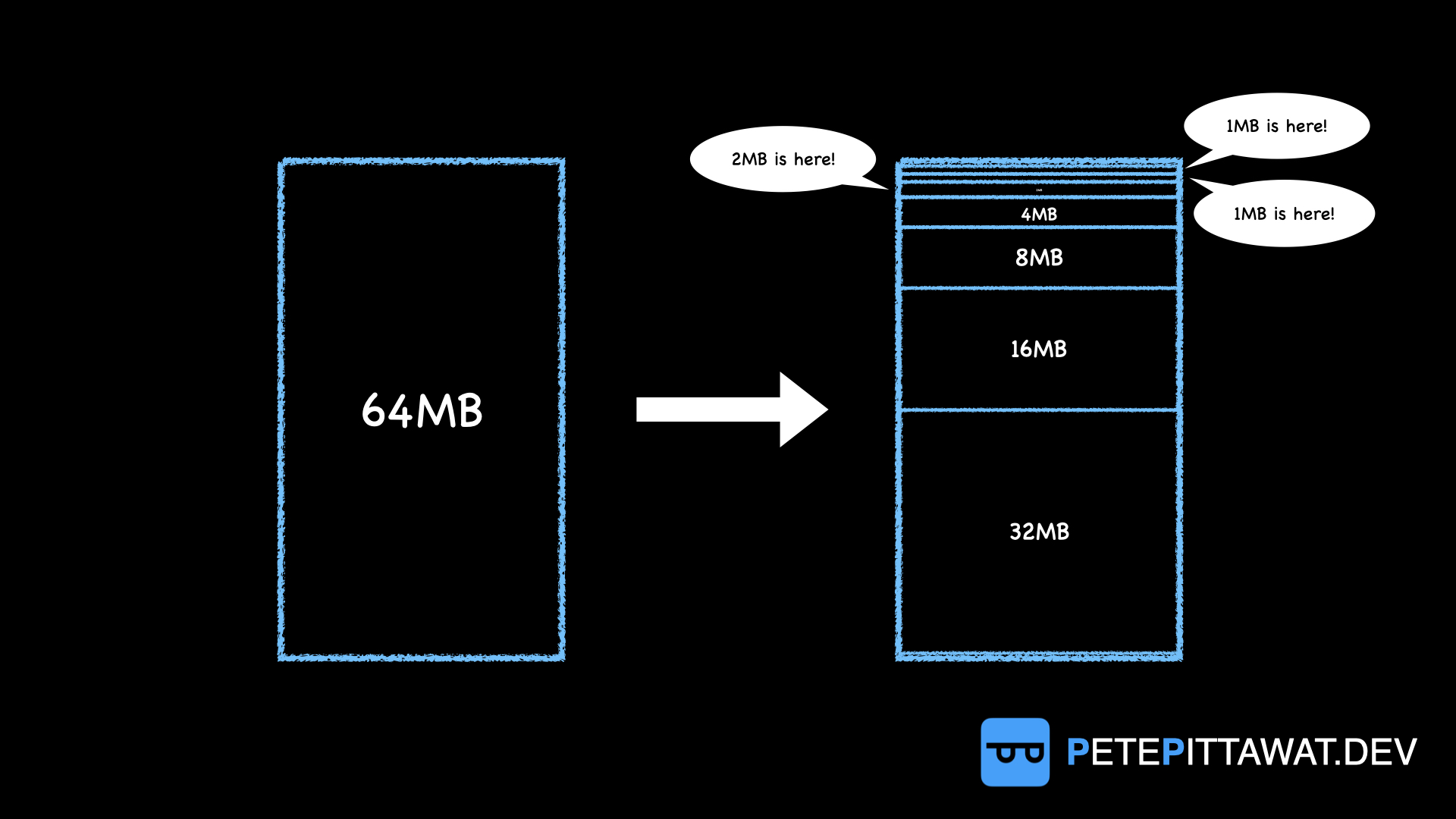
Imagine a scenario where our system has no large processes at all—only six 1MB processes—and both 1MB slots are currently in use. Since the OS aims to maximize system resource utilization, all remaining free slots get occupied by these 1MB processes. At that exact moment, one of the processes in a 1MB slot finishes and returns it to the system, and a 32MB process arrives. Even though we know we have 58MB of total free space, it’s scattered across different slots. The 32MB process cannot be loaded and must wait.
Dynamic Partitioning
Having seen the many problems with fixed-size partitioning, Dynamic Partitioning was introduced to address them. We saw that Fixed Partitioning suffers from Internal Fragmentation, leaving wasted space within allocated slots. Dynamic Partitioning solves this by letting each process declare how much space it needs and allocating only that exact amount. Thus, each partition varies in size and fits each process precisely.
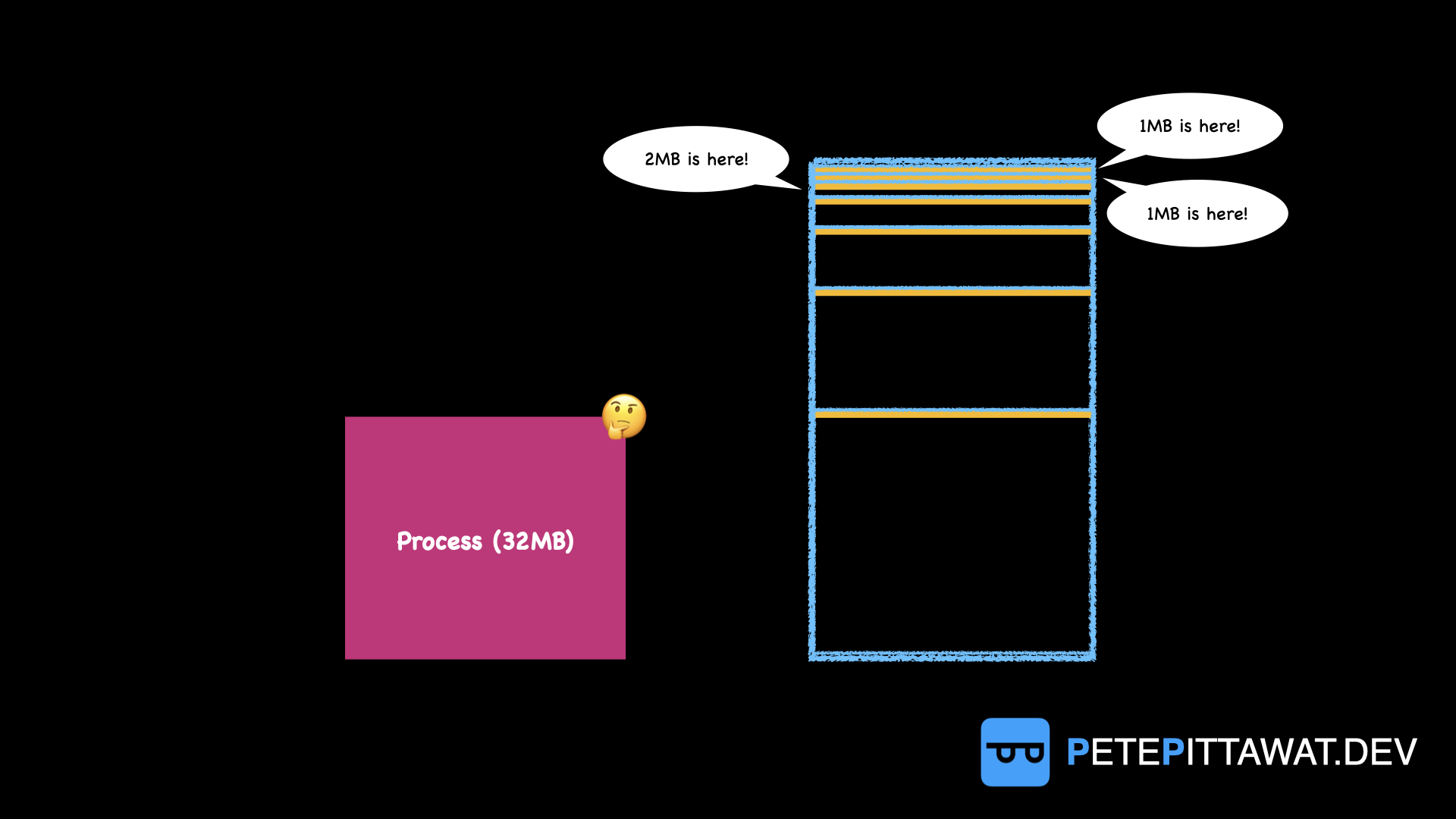
However, this method has its own drawback: something called External Fragmentation. The key difference between External and Internal Fragmentation is that Internal Fragmentation is wasted space inside a slot owned by a process, while External Fragmentation is wasted space between slots owned by two different processes. This means space classified as External Fragmentation isn’t owned by any process at all.
As shown in the figure, even though the combined small free spaces total enough for a new 16MB process, that process cannot be loaded into Main Memory due to External Fragmentation. This occurs when a process that previously occupied a slot completes its execution and returns that space to the system, creating a free block the exact size of that former process.
The main approaches to managing External Fragmentation are Compaction and Placement Algorithms. This article will cover only the first method; the second will be discussed in a future article. Compaction can completely eliminate External Fragmentation but has certain drawbacks that make it impractical to use frequently. Placement Algorithms, meanwhile, attempt to reduce (or minimize) the extent of External Fragmentation.
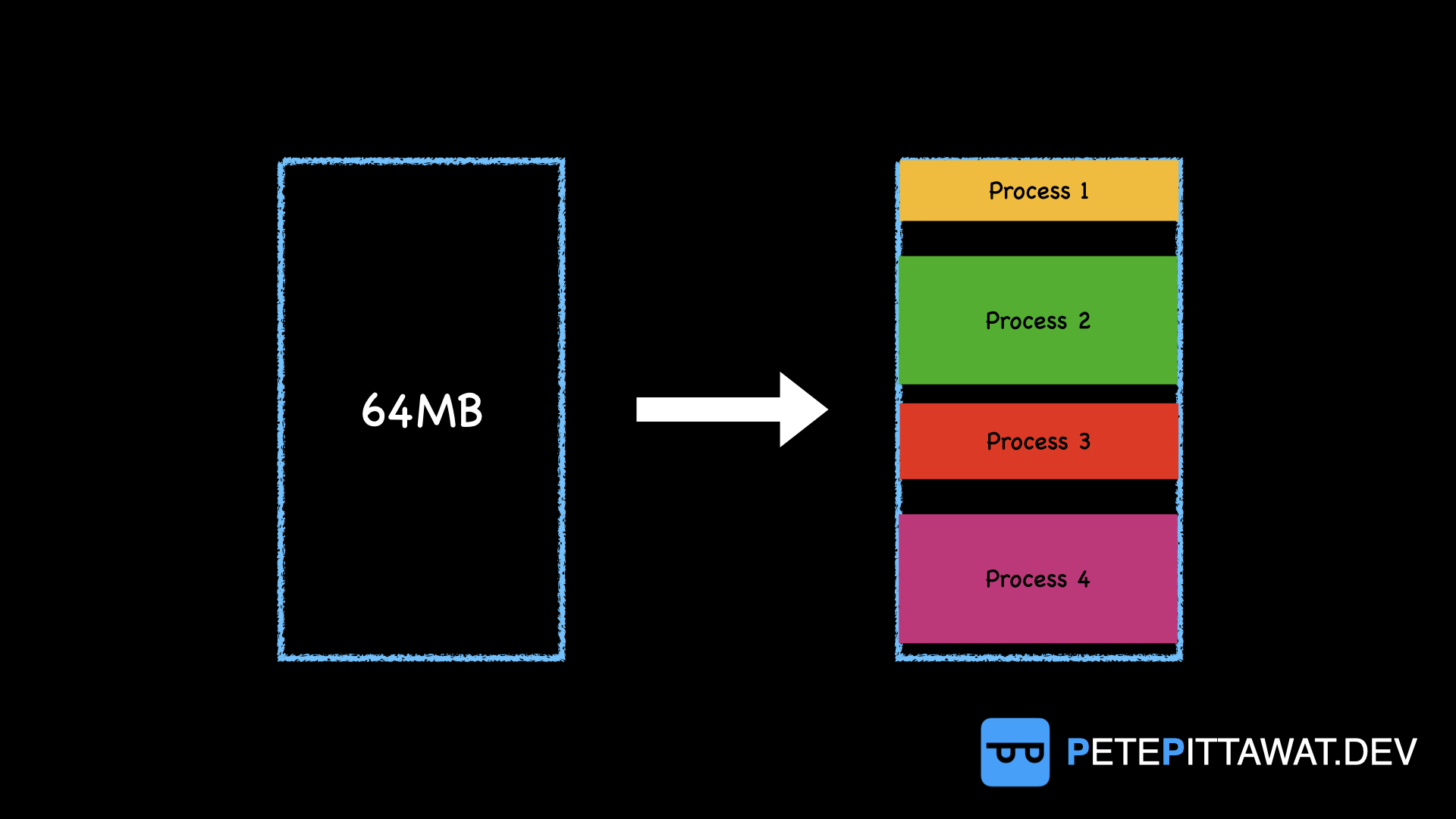
Compaction is one way to eliminate all External Fragmentation by compressing all processes together, as shown in the figure. The result is one large contiguous free space, making it easy to load large processes. However, this method has an obvious drawback: it consumes CPU time to perform compaction in Main Memory instead of running other processes. This reduces system Throughput (the number of processes completed per unit of time), so the OS chooses to do this infrequently.
Final Thought
Of course, these methods are no longer used directly in modern operating systems, given the evolution of OS design over time and the abundance of system resources available today. Nevertheless, the author believes that studying operating system principles is still valuable, if only a little. After all, operating systems are fundamentally about managing resources—space, workers, communication channels, and time as well. So we might say that studying operating systems helps us become better managers, both in our professional lives and in everyday life.
📚 Hope you enjoy reading!